
Try a PreKinder or Kinder class for free
The best way to see whether Reading Bees suits your child is to come to a real class. Your child’s first PreKinder or Kinder class is free, and you can request it in a few minutes through the Reading Bees app.
Requesting a free trial, step by step
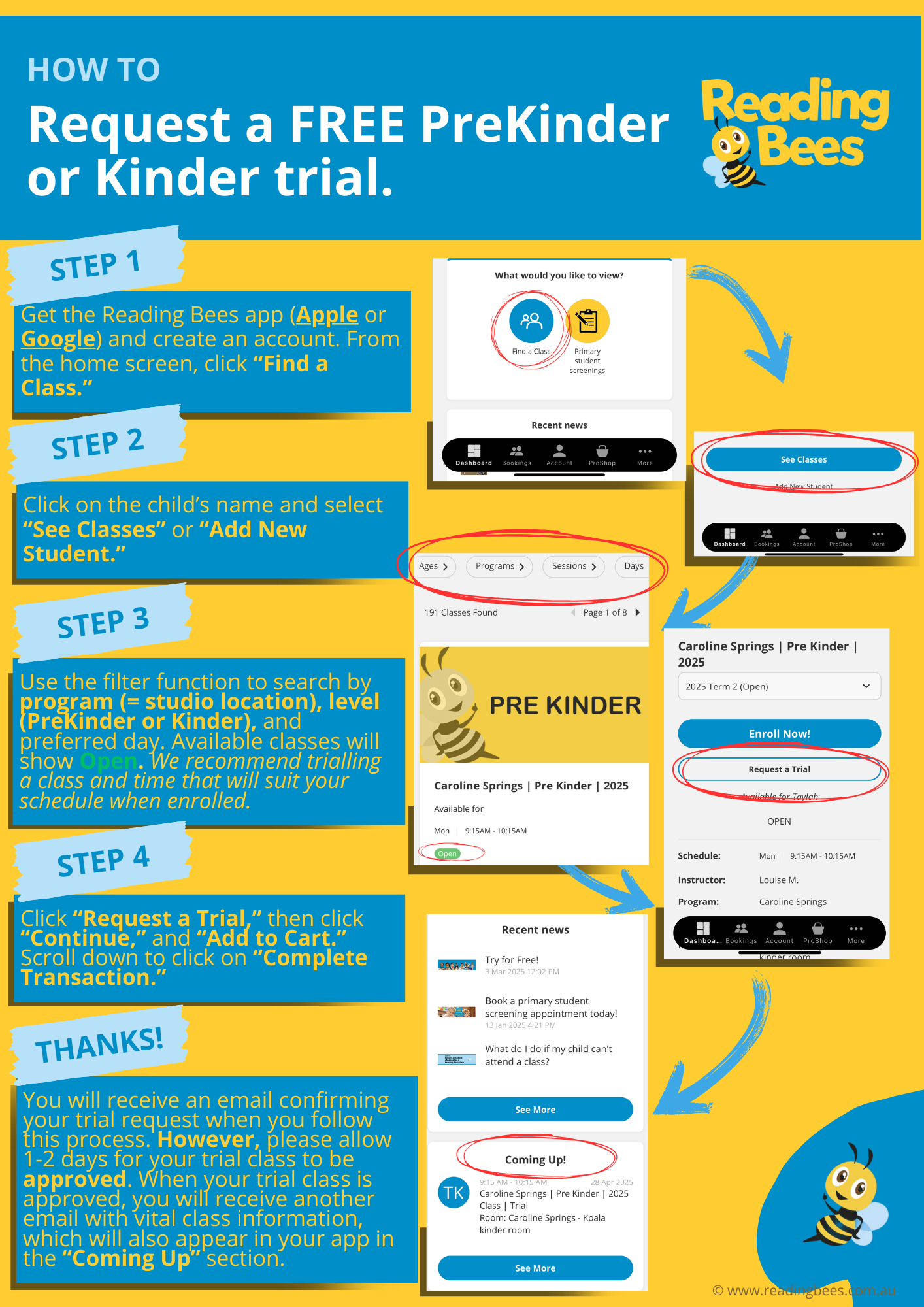
- Get the app. Download the Reading Bees app from the Apple App Store or Google Play and create an account. From the home screen, tap Find a Class.
- Add your child. Tap your child’s name and select See Classes, or tap Add New Student.
- Choose a class. Use the filters to search by program (studio location), level (PreKinder or Kinder) and preferred day. Available classes show as Open. We recommend choosing a day and time that will suit your schedule once your child is enrolled.
- Request your trial. Tap Request a Trial, then Continue and Add to Cart. Scroll down and tap Complete Transaction.
What happens next?
You will receive an email confirming your trial request. Please allow 1–2 days for your trial class to be approved. Once it is approved, you will receive another email with important class information, and the class will appear in the Coming Up section of your app. Not sure which level suits your child? Compare our PreKinder and Kinder programs, or find your nearest studio.