
Why every primary student starts with a screening
Before a Prep to Year 3 student joins a Reading Bees class, we meet them for a short, 20-minute screening appointment. It is not a test. It simply shows us which reading and spelling skills your child already has and where the gaps are, so we can place them in the right skills-based group from their very first lesson. You can book a screening at any of our studios — it doesn’t need to be the one your child will attend regularly.
Booking a screening, step by step
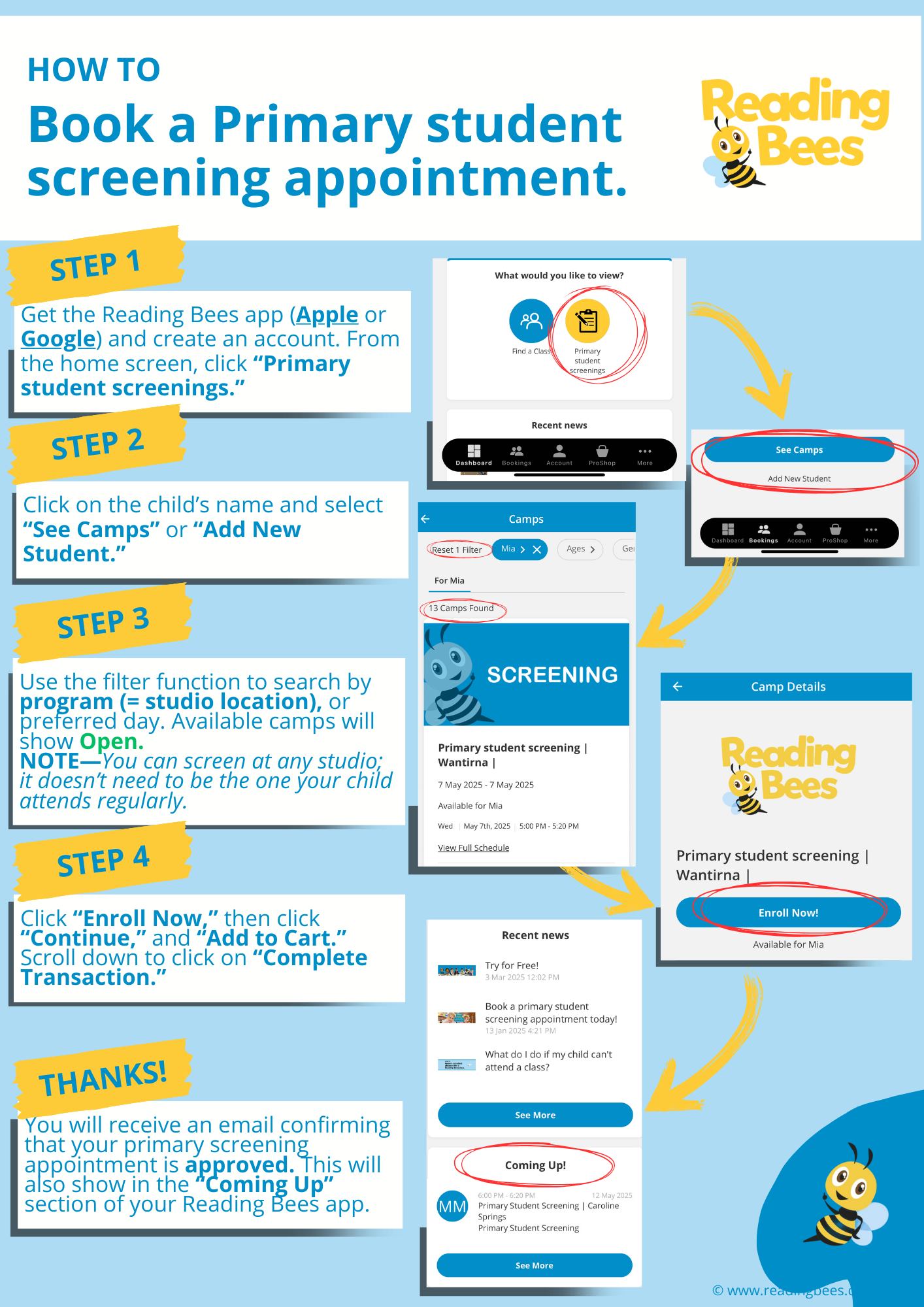
- Get the app. Download the Reading Bees app from the Apple App Store or Google Play and create an account. From the home screen, tap Primary student screenings.
- Add your child. Tap your child’s name and select See Camps, or tap Add New Student.
- Find a time. Use the filters to search by program (studio location) or preferred day. Available sessions show as Open.
- Book it. Tap Enroll Now, then Continue and Add to Cart. Scroll down and tap Complete Transaction.
You will receive an email confirming that your primary screening appointment is approved, and it will also appear in the Coming Up section of your app. Want to know more first? Read what to expect at a primary student screening or learn about our Primary Program.