
Instructions: How to book a makeup lesson after you’ve recorded an absence from class
Booking a make-up lesson, step by step
Life happens, and children miss classes. Once you have reported your child’s absence, the Reading Bees app gives you a Makeup Token so your child can catch up in another class. Here is how to use it.
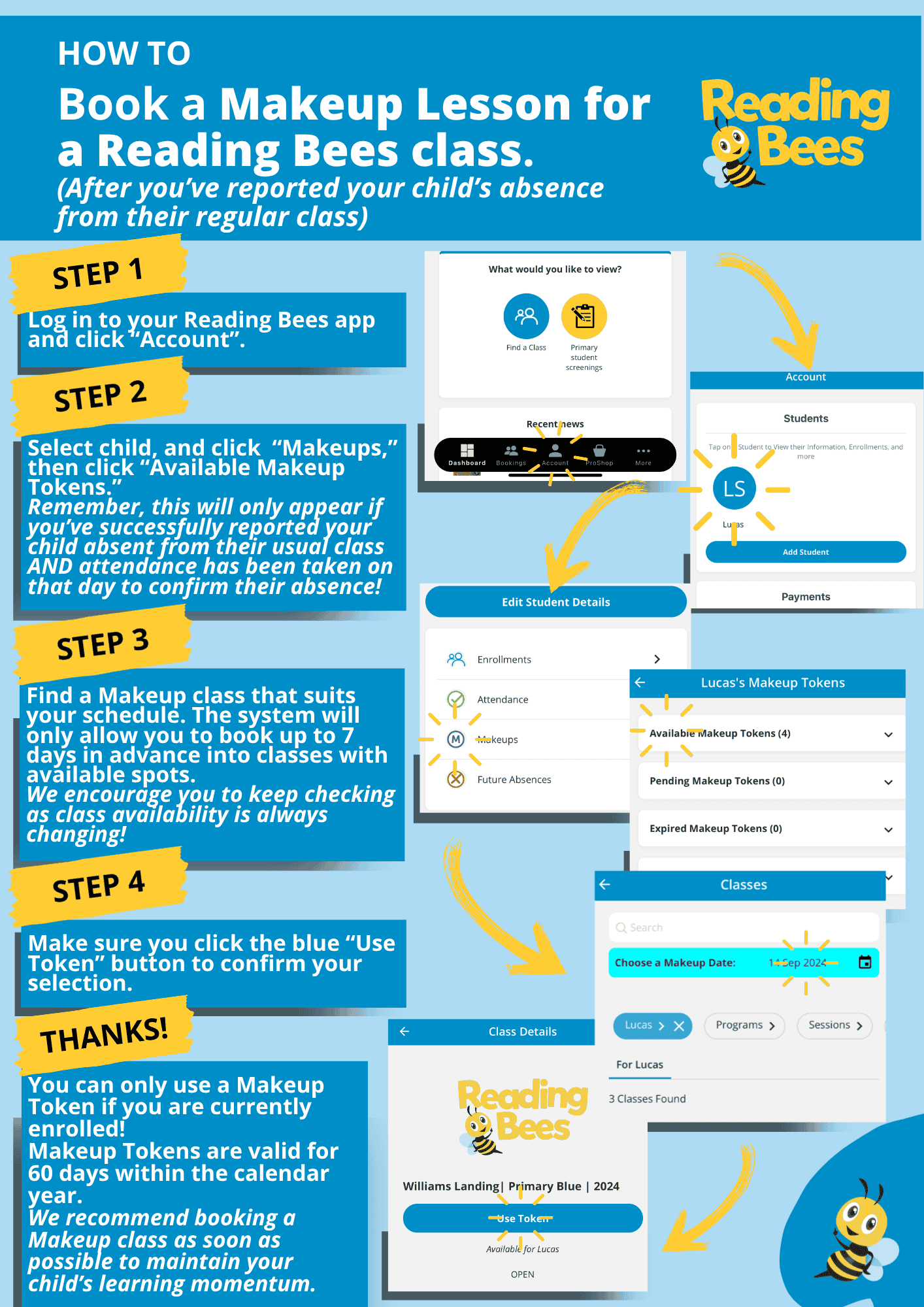
- Log in and open your account. Open the Reading Bees app, log in and tap Account.
- Find your Makeup Tokens. Select your child, tap Makeups, then tap Available Makeup Tokens. Tokens only appear if you reported the absence before the class and attendance has been taken on the day to confirm it.
- Choose a class. Find a make-up class that suits your schedule. You can book up to 7 days ahead into classes that have spots available. Availability changes often, so it is worth checking back.
- Confirm your booking. Tap the blue Use Token button to confirm the class.
Good to know
- You can only use a Makeup Token while your child is currently enrolled.
- Makeup Tokens are valid for 60 days within the calendar year.
- We recommend booking a make-up class as soon as you can, so your child keeps their learning momentum.
Haven’t recorded the absence yet? Read what to do if your child can’t attend a class first. If you need a hand, email us at hello@readingbees.com.au.